Opens in any browser  ·  Your files, on disk  ·  No cloud

The Markdown editor
that opens in any browser

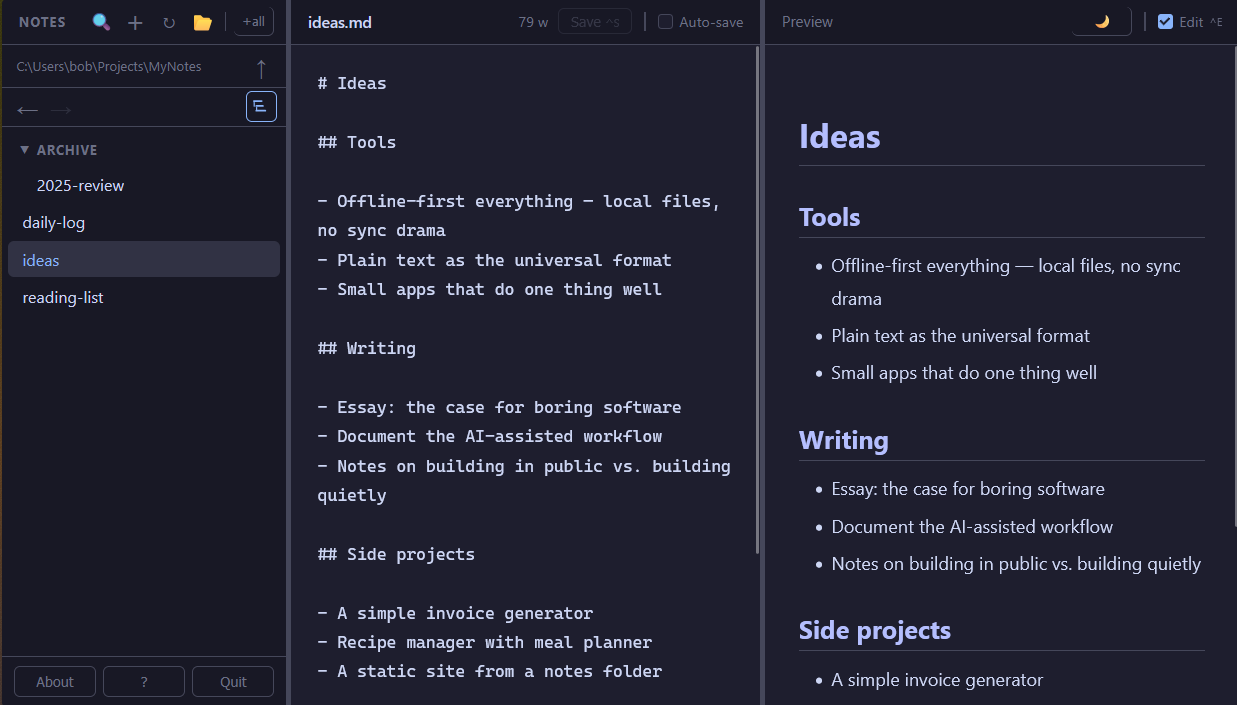
No cloud. No account. No Electron. Opens in any browser — Firefox, Chrome, Safari, Zen — and reads and writes your .md files directly on your machine. A natural fit for AI workflows: point it at your prompts, context files, or agent instructions. All yours, all offline.

Download OwnMark
Free for personal use  ·  ~50 MB  ·  No installer  ·  Double-click and go
OwnMark
OwnMark — three-pane markdown editor showing sidebar, editor, and live preview

Why OwnMark?

📄

It's just files

Your notes are plain .md files in a folder you choose. Open them in any editor. Back them up however you like. No export step, no lock-in. Unlike browser-based editors that save to browser storage — gone the moment you clear your cache — OwnMark writes to your actual filesystem.

🤖

Built for AI workflows

Claude Code, Cursor, Aider, and most AI tools speak Markdown. Point OwnMark at the same folder your AI uses — prompts, context files, agent instructions — and you have a fast, searchable editor for everything your AI reads and writes. Offline. Private. No copy-paste required.

No installation ceremony

Download one file (~50 MB). Double-click it. No installer, no runtime to manage, no Node.js required. It just starts. Apps that bundle their own browser runtime weigh 150–200 MB — OwnMark is a fraction of that.

🌐

Your browser, any browser

Not Electron. Not a bundled WebView. Firefox, Chrome, Arc, Vivaldi, Zen, Safari — whichever you run, OwnMark opens in it, with your extensions, your zoom, your bookmarks. There is no other local-first notes app that does this.

🔌

Works offline

No internet connection required — not even to start. All assets are bundled. Your notes stay on your machine.

🔧

Scriptable API

Because OwnMark runs a real local server, there's a REST API right there. Automate it, integrate it, inspect it with curl.

The honest comparison

We're not trying to be Obsidian. Here's what we are.

OwnMark Obsidian Notion Dillinger †
Runs in your own browser
Direct file system access
Your files, plain text
No account required
No internet required
Scriptable REST API paid
Executable size ~50 MB ~300 MB web app web app
Plugin ecosystem large

If you want a plugin ecosystem and a graph view, use Obsidian — it's excellent. OwnMark is for people who want something small, immediate, and out of the way.

† Dillinger stores notes in browser storage rather than as files on your machine. Access to your local file system requires import/export.

Everything you need

Nothing you don't.

Write and edit Markdown notes — .md, .txt, and more
Live Markdown preview alongside the editor
Full-text and filename search, with highlights in preview
Use any folder on your machine as your notes folder
Linked notes — click to navigate, hover to preview, click a dangling link to create a new note
Backlinks panel — see every note that links to the one you're reading
Rename a note — all links to it update automatically
Rename, delete, and create notes from the sidebar
Resizable layout — 3-pane edit or 2-pane preview
Auto-save while you type, or save manually with Ctrl+S
Back and forward history across notes and folders
Drag images and notes into the editor — renders inline
Three themes — light, dark, and sepia — plus custom
All settings and layout remembered between sessions
Tree view or flat list for focus — match how you're working

How it works

1

Download

One .exe file. No installer, no dependencies.

2

Double-click

A small local server starts and your browser opens automatically.

3

Point it at your notes

Choose any folder on your machine. OwnMark reads and writes files there directly.

4

Write

Your notes are plain .md files. They were always yours.

🛫
Companion app

Write here. Publish there.

OwnShip is a single PHP file you drop on any shared host. Point it at the same folder of .md files — it serves them publicly, read-only, with navigation and the same three themes. No database, no CMS, no framework. Write in OwnMark, upload when ready.

Learn about OwnShip →

Pricing

Free for personal use. One-time license for commercial use — introductory pricing.

Personal
Free
Full app, no time limit. For personal, non-commercial use.
Download
Bundle
$29 one-time
OwnMark + OwnShip. Write locally, publish to your host.
Get the bundle

If OwnMark has been useful, a small tip is always welcome.

All licenses are one-time purchases — no subscription, no renewal. Read the full license terms.

Download OwnMark

Free for personal use. No installer — download and double-click.

Windows
Download .exe
v0.9.15 ·  Windows 10/11, 64-bit
~43 MB
macOS
Download for Apple Silicon
v0.9.15 ·  macOS 12+, M1/M2/M3
Also: Intel Mac  ·  ~57 MB
Linux
Download binary
v0.9.15 ·  x86-64
~55 MB  ·  Debian/Ubuntu tested
Windows: SmartScreen may warn on first run — click More infoRun anyway. OwnMark does not connect to the internet and does not touch anything outside your notes folder.

macOS (Apple Silicon): xattr -d com.apple.quarantine OwnMark-arm64 && chmod +x OwnMark-arm64
macOS (Intel): xattr -d com.apple.quarantine OwnMark-x64 && chmod +x OwnMark-x64

Linux: Make executable before running: chmod +x OwnMark-linux && ./OwnMark-linux

Updating? OwnMark can update itself (About → Update), or you can just download the latest here and replace your existing OwnMark file — your notes and settings live separately and are left untouched.